DropDown / Rollover Menu with pure CSS / HTML

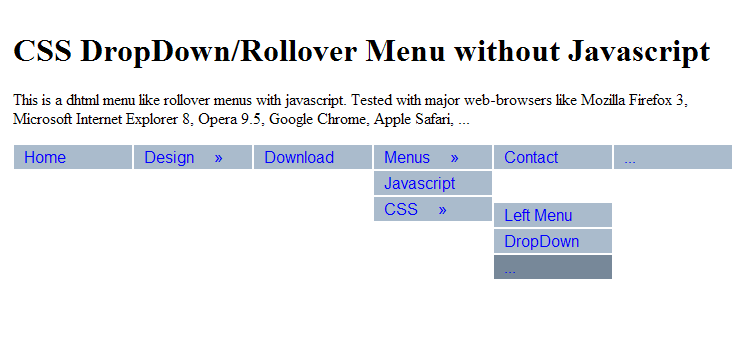
CSS Menu without JavaScript, Pure-CSS, Hidden, Mouseover-EffectThis is another CSS Menu with changed direction. Many website visitors are online with javascript-disabled clients(because of filters, access rules etc). And you want use a nice rollover multi-level menu on your homepage. CSS ist the perfect solution for this. All modern browsers like Mozilla Firefox, Microsoft Internet Explorer, Opera, Google Chrome, Apple Safari support css. Just copy & save code below as anything.html to see how this hidden menu works. You can use images(e. arrows), flash instead of links. Click for a Demo of rollover top menu


<!DOCTYPE html PUBLIC "-//W3C//DTD XHTML 1.0 Transitional//EN" "DTD/xhtml1-transitional.dtd">
<html><head>
<title>CSS DropDown Menu without JavaScript, PureCSS, Rollover</title>
<style type="text/css">
body { padding: 3em; }

#cssm1 *  { padding:0; margin: 0; font: 1em arial; }

#cssm1 { position: absolute;  z-index: 99; margin: 0 auto; float: left; line-height: 20px; }

#cssm1 a { display: block; border: 1px solid #fff; background: #abc; text-decoration: none; padding: 3px 10px; }
#cssm1 a:hover { background: #789; }


#cssm1 ul li, #cssm1 ul li ul li  { width: 120px; list-style-type:none; }

#cssm1 ul li { float: left; width: 120px; }

#cssm1 ul li ul, #cssm1:hover ul li ul, #cssm1:hover ul li:hover ul li ul{ 
	display:none;
	list-style-type:none; 
	width: 120px;
	}

#cssm1:hover ul, #cssm1:hover ul li:hover ul, #cssm1:hover ul li:hover ul li:hover ul { 
	display:block; 
	}

#cssm1:hover ul li:hover ul li:hover ul { 
	position: absolute;
	margin-left: 120px;
	margin-top: -20px;
	}


</style>

</head><body>
<div>
<h1>CSS DropDown/Rollover Menu without Javascript</h1>
<p>This is a dhtml menu like rollover menus with javascript. Tested with major web-browsers like Mozilla Firefox 3, Microsoft Internet Explorer 8, Opera 9.5, Google Chrome, Apple Safari, ...</p>
</div>

<div id="cssm1">
	<ul>
		<li><a href="http://www.cafewebmaster.com">Home</a></li>
		<li><a href="#">Design &nbsp; &nbsp; »</a>
				<ul>
				<li><a href="#">Graphics</a></li>
				<li><a href="#">Themes &nbsp; &nbsp; »</a>
					<ul>
						<li><a href="#">Joomla</a>
						<li><a href="#">Drupal</a>
						<li><a href="#">Wordpress</a>
					</ul>
				</li>
			</ul>
		
		</li>
		<li><a href="#">Download</a></li>
		<li><a href="#">Menus &nbsp; &nbsp;  »</a>
			<ul>
				<li><a href="#">Javascript</a></li>
				<li><a href="#">CSS &nbsp; &nbsp; »</a>
					<ul>
						<li><a href="#">Left Menu</a>
						<li><a href="#">DropDown</a>
						<li><a href="#">...</a>
					</ul>
				</li>
			</ul>
		</li>
		<li><a href="#">Contact</a></li>
		<li><a href="#">...</a></li>
		
	</ul>
</div>
</body></html>


This is exactly what I need, thank you very much!

Really nice horizontal menu. How can I use arrows for submenus?

You mean like in the demo page? Add the HTML code » in front of whatever will have a rolldown (the Design section in the demo page, for example).

The aforementioned HTML code didn't display, the code for the arrows is & # 1 8 7 ; (remove spaces).

It works perfectly with Firefox, but it doesn't work with IE 6.0 which is most people still using it now, if this is working, it would be perfect for most people...

You need additional Javascript code for IE6. I do not think that such pure-css menus avaliable for IE6 and older.

Great menu! Thanks.

How can I expand the width of a drop down menu entry when it's open? Say I have:

<li><a href="#">Menus &nbsp; &nbsp;  »</a>
			<ul>
				<li><a href="#">Javascript is awful</a></li>

The "Javascript is awful" is split over two lines and the menu item is a fixed width. How can I force the menu item to expand to fit the text on one line?

Thanks

You can change width of second level menu items. Look at top of this page.

Very nice! Seems to good to be true, whats the catch? :) Small amount of markup, very effective and just 1px out on the sub menu between FF 3 / IE 7, haven't tested IE 6.

Thanks for sharing

This was a very helpful menu code, but I was wondering if there is a simple way to get it to remain a fixed width? For example, if I resize the browser window, the menu shrinks and stacks on top of itself in order to completely fit in the window, while I was hoping that I could have it remain on one horizontal line no matter what the browser window size. Thanks!

Post new comment

The content of this field is kept private and will not be shown publicly.
  • Use <pre> all your html php come here </pre> for your code
  • Web page addresses and e-mail addresses turn into links automatically.
  • Allowed HTML tags: <b> <pre> <h1> <h2> <h3> <h4> <h5> <h6> <a> <em> <strong> <cite> <code> <ul> <ol> <li> <dl> <dt> <dd> <div> <style><img> <br> <blockquote>
  • Lines and paragraphs break automatically.
  • You may insert videos with [video:URL]

More information about formatting options

CAPTCHA
This question is for testing whether you are a human visitor and to prevent automated spam submissions.
Image CAPTCHA
Enter the characters (without spaces) shown in the image.

CafeWebmaster.com(CW) is a free online community for webdevelopers and beginners. Anybody can share their code, articles, tips, tutorials, code-examples or other webdesign related material on the site. Newbies can submit their questions and reply to existing questions. CW does not guarantee or warrant reliability of code, data and information published on the site. Use the site on your own risk. The site takes no responsibility of direct or indirect loss or any kind of harm to its users. The site also doesn't take responsibility of infected files or source code with any kind of infection or viruses, worms, spywares, malwares, trojan horses. CW reserves the right to edit, move, or delete any of content for any reason.