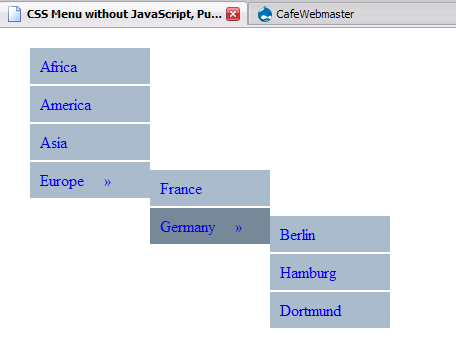
Pure CSS Mouseover Menu without Javascript
Many internet users are online with javascript-disabled clients(because of security or performance reasons). And you want use a nice mouseover multi-level menu on your homepage. CSS ist the perfect solution for this. All modern browsers like Mozilla Firefox, Microsoft Internet Explorer, Opera, Google Chrome, Apple Safari support css. Just copy & save code below as anything.html to see how this hidden menu works. You can use images, flash instead of links. Click here for a Demo
<!DOCTYPE html PUBLIC "-//W3C//DTD XHTML 1.0 Transitional//EN" "DTD/xhtml1-transitional.dtd">
<html><head>
<style type="text/css">
#cssm1 * { padding:0; margin: 0; }
#cssm1 {position: absolute; z-index: 99; top:20px; left: 35px; position: fixed; left:10; top:20; float: left; margin:0; line-height: 30px; }
#cssm1 a { display: block; border-bottom: 2px solid #fff; background: #abc; text-decoration: none; padding: 3px 10px; }
#cssm1 a:hover { background: #789; }
#cssm1 ul li, #cssm1 ul li ul li { width: 120px; }
#cssm1 ul, #cssm1:hover ul li ul, #cssm1:hover ul li:hover ul li ul{
display:none;
list-style-type:none;
width: 120px;
}
#cssm1:hover ul, #cssm1:hover ul li:hover ul, #cssm1:hover ul li:hover ul li:hover ul {
display:block;
}
#cssm1:hover ul li:hover ul, #cssm1:hover ul li:hover ul li:hover ul {
position: absolute;
left: 120px; top: 10;
}
#cssm1 ul li ul, #cssm1 ul li ul li ul { clear: left; margin-top: -30px; }
#cssm3 { background-color: #c3f; padding: 3px; text-align: center; }
#cssm1:hover #cssm3 { display:none; }
</style>
</head><body>
<div id="cssm1">
<ul>
<li><a href="#">Africa</a></li>
<li><a href="#">America</a></li>
<li><a href="#">Asia</a></li>
<li><a href="#">Europe »</a>
<ul>
<li><a href="#">France</a></li>
<li><a href="#">Germany »</a>
<ul>
<li><a href="#">Berlin</a>
<li><a href="#">Hamburg</a>
<li><a href="#">Dortmund</a>
</ul>
</li>
</ul>
</li>
</ul>
<div id="cssm3">M<br />E<br />N<br />U</div>
</div>
</body></html>


Why arent you using an un/ordered list? it would be the more accessible solution.
The updated multi-level version is very good. Thak you!
Can you create a horizontal drop-down menu for the top of page, header area? First level a rollover to bottom and second and third level to right. Cou you make menu open and close slowly? I found a good menu with that effect on dynamidrive but it uses javascript.
Can u add arrows for parent menu items with sub lists?
This is a cool and simple menu.
My only question is, how can you make the same menu working using an external htm file for the source of the menu list in order to simplify implementing this menu on a website with many pages?
The main point is not just implementing it on hundreds of pages the very first time, but if I have to add or remove a menu list item later, if a single external file is used for the menu list itself, I only have to update that single file, instead of all of the webpages.
for example:
I've been looking all over for a solution like this (with and without java script), but so far I couldn't find nor get an answer.
Regards,
All what you need put all style code in an external .css file and call it with < link > tag. You can use it for multiple .html pages.
Thank you for your reply but I think my question wasn't clear enough.
You suggested to put all style code in an external .css file and call it with a < link > tag. I already have that.
I mean, I know how to do that. My question was only about the list of the menu items that starts with "< div id="cssm1"> and ends with "< /div>". This is the part that I want to put in an external .html file so that every time I modify the menu list itself, it will effect all pages on the website. In other words, I don't want to "clutter" all web pages with the menu list itself.
What I left out from the example code in my first message is that I was assuming that the example code is not for a sample of a menu html file but a sample for all other hundreds of webpages on the webserver that have a link or a reference to the menu.
Since this messaging window, that I am typing this message in doesn't allow full text of all kind of scripts, I simplified the example code with one words like < style> meant the < link> reference to the external .css file.
The < code> ment to be the reference code with one or two lines max. for the menu list file which is not known by me, that is exactly the part that I want to know how to do.
And to complete my explanation, the space between < /code> and < /body> is where the html content of the webpages go to.
On the second thought: Maybe where I am mistaken is the final use or purpose of your menu code above???
Until know I was in the firm belief that the html sample code that you posted is an example for a regular web page that INCLUDES the code and the list for the menu IN THE SAME PAGE.
Is it possible, that your sample code is only for the menu itself, and you're not supposed to put the rest of the web page in the same file, but you supposed to reference this html file into the top of all other regular web pages?
If that's the case, how do you do that? Using some kind of < div.. code?
I am lost here.
Regards,
try this two steps:
1. put your menu code in an external file (ie: menu.inc.html)
2. put css code in an external file
include "menu.inc.html" to your all pages
be sure that everypage calls right css file
it should work everywhere
GREAT WORK!!
Thank you, and it was DEAD easy to use. I just copy and pasted the code into my site.
Other examples had problem with IE, and special fixes, but not this.
thank you.
I've been going out of my mind to do this without javascript. Then I thought I should search online. was lucky to have found your code. It fits in perfect. Thank you!
___________
dedicated server
I'm using IE7 (company standards...) and it's not working at all. Every time I mouse over the white space between the boxes the whole menu closes back up to the top level. Since there is no contiguous path to "Germany", I can't open the third level.
Can anybody tell me how to modify this code in order to position the menu to the right of the word MENU ..not over it as it initially is designed to work?
Post new comment